> For the complete documentation index, see [llms.txt](https://docs.urbit.org/llms.txt). Markdown versions of documentation pages are available by appending `.md` to page URLs; this page is available as [Markdown](https://docs.urbit.org/build-on-urbit/hoon-school/g-trees.md).
# 6. Trees and Addressing
Understanding Urbit's binary tree data representation, tree addressing systems, data location and evaluation, the \`+list\` mold, and standard library operations for working with tree-structured data.
*Every noun in Urbit is an atom or a cell. This module will elaborate how we can use this fact to locate data and evaluate code in a given expression. It will also discuss the important `+list` mold builder and a number of standard library operations.*
## Trees
Every noun in Urbit is a either an atom or a cell. Since a cell has only two elements, a head and a tail, we can derive that everything is representable as a [*binary tree*](https://en.wikipedia.org/wiki/Binary_tree). We can draw this layout naturally:
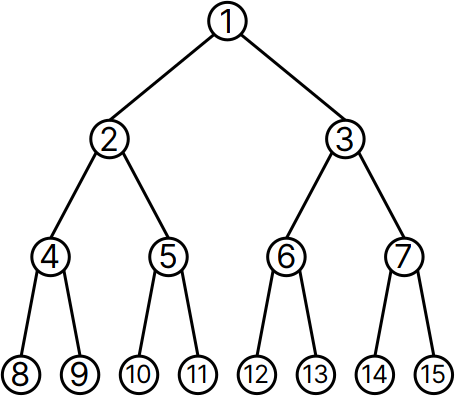
A binary tree has a single base node, and each node of the tree may have up to two child nodes (but it need not have any). A node without children is a “leaf”. You can think of a noun as a binary tree whose leaves are atoms, i.e., unsigned integers. All non-leaf nodes are cells. An atom is a trivial tree of just one node; e.g., `17`.
For instance, if we produce a cell in the Dojo
```
> =a [[[8 9] [10 11]] [[12 13] [14 15]]]
```
it can be represented as a tree with the contents
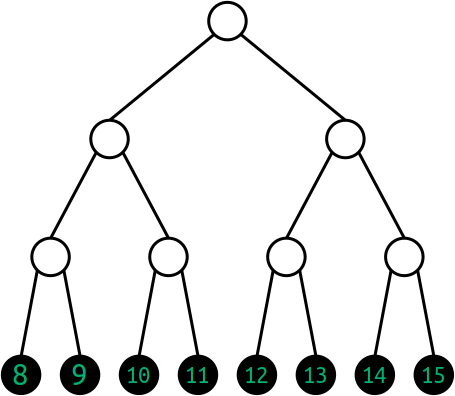
We will use the convention in these graphics that black-text-on-white-circle represents an address, and that green-text-on-black-circle represents the content at that address. So another way to represent the same data would be this:
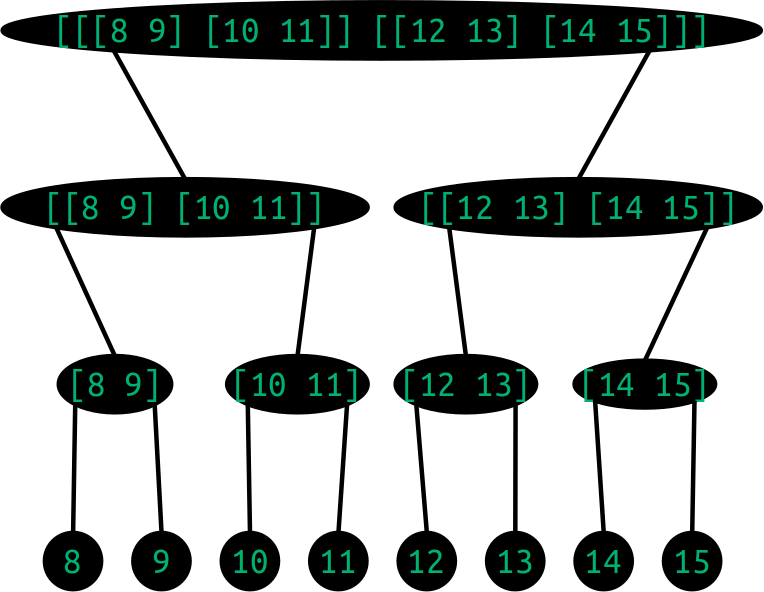
When we input the above cell representation into the Dojo, the pretty-printer hides the rightwards-branching square brackets.
```
> [[[8 9] [10 11]] [[12 13] [14 15]]]
[[[8 9] 10 11] [12 13] 14 15]
```
We can refer to any data stored anywhere in this tree. The numbers in the labeled diagram above are the *numerical addresses* of the tree, and may be extended indefinitely downwards into ever-deeper tree representations.
Most of any possible tree will be unoccupied for any actual data structure. For instance, `+list`s (and thus `$tape`s) are collections of values which occupy the tails of cells, leading to a rightwards-branching tree representation. (Although this may seem extravagant, it has effectively no bearing on efficiency in and of itself; that's a function of the algorithms working with the data.)
### Exercise: Map Nouns to Tree Diagrams
Consider each of the following nouns. Which tree diagram do they correspond to? (This is a matching exercise.)
| Noun | Tree Diagram |
| ------------------ | ------------------------------------------------------------------------------------- |
| 1. `[[[1 2] 3] 4]` | A.  |
| 2. `[[1 2] 3 4]` | B. 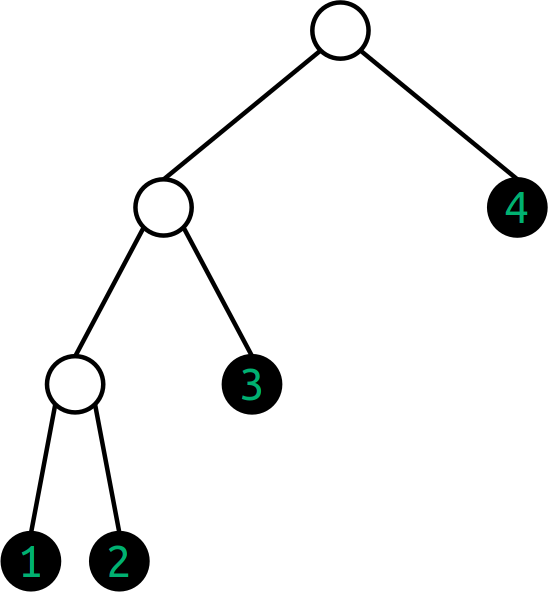 |
| 3. `[1 2 3 4]` | C.  |
### Exercise: Produce a List of Numbers
Produce a generator called `/gen/list.hoon` which accepts a single `@ud` number *n* as input and produces a list of numbers from `1` up to (but not including) *n*. For example, if the user provides the number `5`, the program will produce: `~[1 2 3 4]`.
```hoon
|= end=@
=/ count=@ 1
|-
^- (list @)
?: =(end count)
~
:- count
$(count (add 1 count))
```
In the Dojo:
```
> +list 5
~[1 2 3 4]
> +list 10
~[1 2 3 4 5 6 7 8 9]
> +list 1
~
```
OK, we've seen these runes before. This time we want to focus on the list, the thing that's being built here.
This program works by having each iteration of the list create a cell. In each of these cells, the head (the cell's first position) is filled with the current-iteration value of `.count`. The tail of the cell, its second position, is filled with *the product of a new iteration of our code* that starts at `|-`. This iteration will itself create another cell, the head of which will be filled by the incremented value of `.count`, and the tail of which will start another iteration. This process continues until `?:` branches to `~` (pronounced "null"). When that happens, it terminates the list and the expression ends. A built-out list of nested cells can be visualized like this:
```
[1 [2 [3 [4 ~]]]]
.
/ \
1 .
/ \
2 .
/ \
3 .
/ \
4 ~
```
### Tuples as Trees
What we've been calling a running cell would more conventionally be named a "tuple", so we'll switch to that syntax now that the idea is more familiar. Basically it's a cell series which doesn't necessarily end in `~`.
Given the cell `[1 2 3 4 ~]` (or equivalently `~[1 2 3 4]`, an irregular form for a null-terminated tuple or list), what tree address does each value occupy?
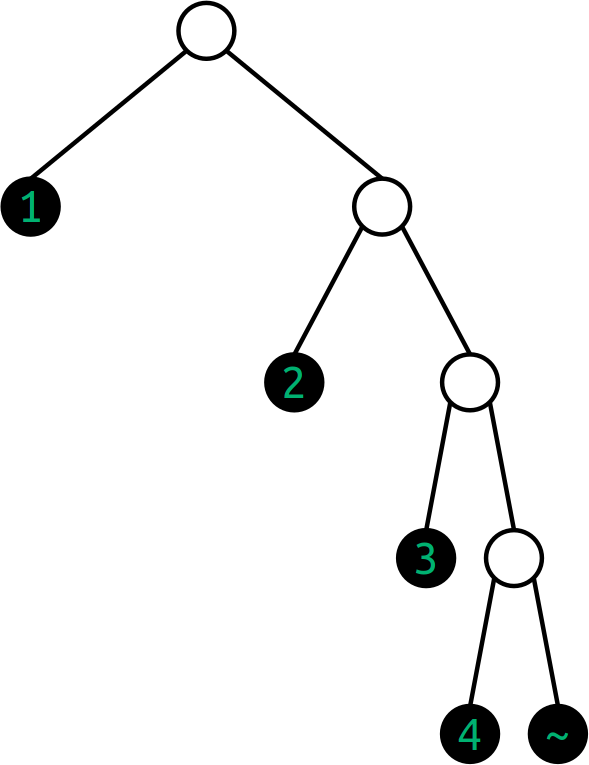
At this point, you should start to be able to work this out in your head, at least for the first few rows. The `+` operator can be used to return the limb of the subject at a given numeric address. If there is no such limb, the result is a crash.
```
> =data ~[1 2 3 4]
> +1:data
[1 2 3 4 ~]
> +2:data
1
> +3:data
[2 3 4 ~]
> +4:data
dojo: hoon expression failed
> +6:data
2
> +7:data
[3 4 ~]
> +14:data
3
> +15:data
[4 ~]
> +30:data
4
> +31:data
~
```
### Lists as Trees
We have used `+list`s incidentally. A `+list` is an ordered arrangement of elements ending in a `~`. Most lists have the same kind of content in every element (for instance, a `(list @rs)`, a list of numbers with a fractional part), but some lists have many kinds of things within them. Some lists are even empty.
```
> `(list @)`['a' %b 100 ~]
~[97 98 100]
```
(Notice that all values are converted to the specified aura, in this case the empty aura.)
A `+list` is built with the `+list` mold. **A `+list` is actually a "mold builder", a gate that produces a gate. This is a common design pattern in Hoon. (Remember that a `$mold` is a type and can be used as an enforcer: it attempts to convert any data it receives into the given structure, and crashes if it fails to do so.)** Lists are commonly written with a shorthand `~[]`:
```
> `(list)`~['a' %b 100]
~[97 98 100]
```
```
> `(list (list @ud))`~[~[1 2 3] ~[4 5 6]]
~[~[1 2 3] ~[4 5 6]]
```
True `+list`s have `i` and `t` faces which allow the head and tail of the data to be quickly and conveniently accessed; the "head" is the first element while the "tail" is everything else. **If something has the same *****structure***** as a `+list` but hasn't been explicitly labeled as such, then Hoon won't always recognize it as a `+list`. In such cases, you'll need to explicitly mark it as such:**
```
> [3 4 5 ~]
[3 4 5 ~]
> `(list @ud)`[3 4 5 ~]
~[3 4 5]
> -:!>([3 4 5 ~])
#t/[@ud @ud @ud %~]
> -:!>(`(list @ud)`[3 4 5 ~])
#t/it(@ud)
```
A null-terminated tuple is almost the same thing as a list. (That is, to Hoon all lists are null-terminated tuples, but not all null-terminated tuples are lists. This gets rather involved in subtleties, but you should cast a value as `(list @)` or another type as appropriate whenever you need a `+list`. See also [`+limo`](/hoon/stdlib/2b.md#limo) which explicitly marks a null-terminated tuple as a `+list`.)
## Addressing Limbs
Everything in Urbit is a binary tree. And all code in Urbit is also represented as data. One corollary of these facts is that we can access any arbitrary part of an expression, gate, core, whatever, via addressing (assuming proper permissions, of course). (In fact, we can even hot-swap parts of cores, which is how [wet gates](/build-on-urbit/hoon-school/r-metals.md#wet-gates) work.)
There are three different ways to access values:
1. [Numeric addressing](#numeric-addressing) is useful when you know the address, rather like knowing a house's street address directly.
2. [Positional addressing](#positional-addressing-lark-notation) is helpful when you don't want to figure out the room number, but you know how to navigate to the value. This is like knowing the directions somewhere even if you don't know the house number.
3. [Wing addressing](#wings) is a way of attaching a name to the address so that you can access it directly.
### Numeric Addressing
We have already seen numeric addressing used to refer to parts of a binary tree.

Since a node is *either* an atom (value) *or* a cell (fork), you never have to decide if the contents of a node is a direct value or a tree: it just happens.
### Exercise: Tapes for Text
A tape is one way of representing a text message in Hoon. It is written with double quotes:
```hoon
"I am the very model of a modern Major-General"
```
A `$tape` is actually a `(list @tD)`, a binary tree of single characters which only branches rightwards and ends in a `~`:

What are the addresses of each letter in the tree for the Gilbert & Sullivan quote above? Can you see the pattern?
### Positional Addressing (Lark Notation)
Much like relative directions, one can also state “left, left, right, left” or similar to locate a particular node in the tree. These are written using `-` (left) and `+` (right) alternating with `<` (left) and `>` (right).

Lark notation can locate a position in a tree of any size. However, it is most commonly used to grab the head or tail of a cell, e.g. in the "type spear" (on which [more later](/build-on-urbit/hoon-school/m-typecheck.md)):
```hoon
-:!>('hello Mars')
```
Lark notation is not preferred in modern Hoon for more than one or two elements deep, but it can be helpful when working interactively with a complicated data structure like a JSON data object.
When lark expressions resolve to the part of the subject containing an arm, they don't evaluate the arm. They simply return the indicated noun fragment of the subject, as if it were a leg.
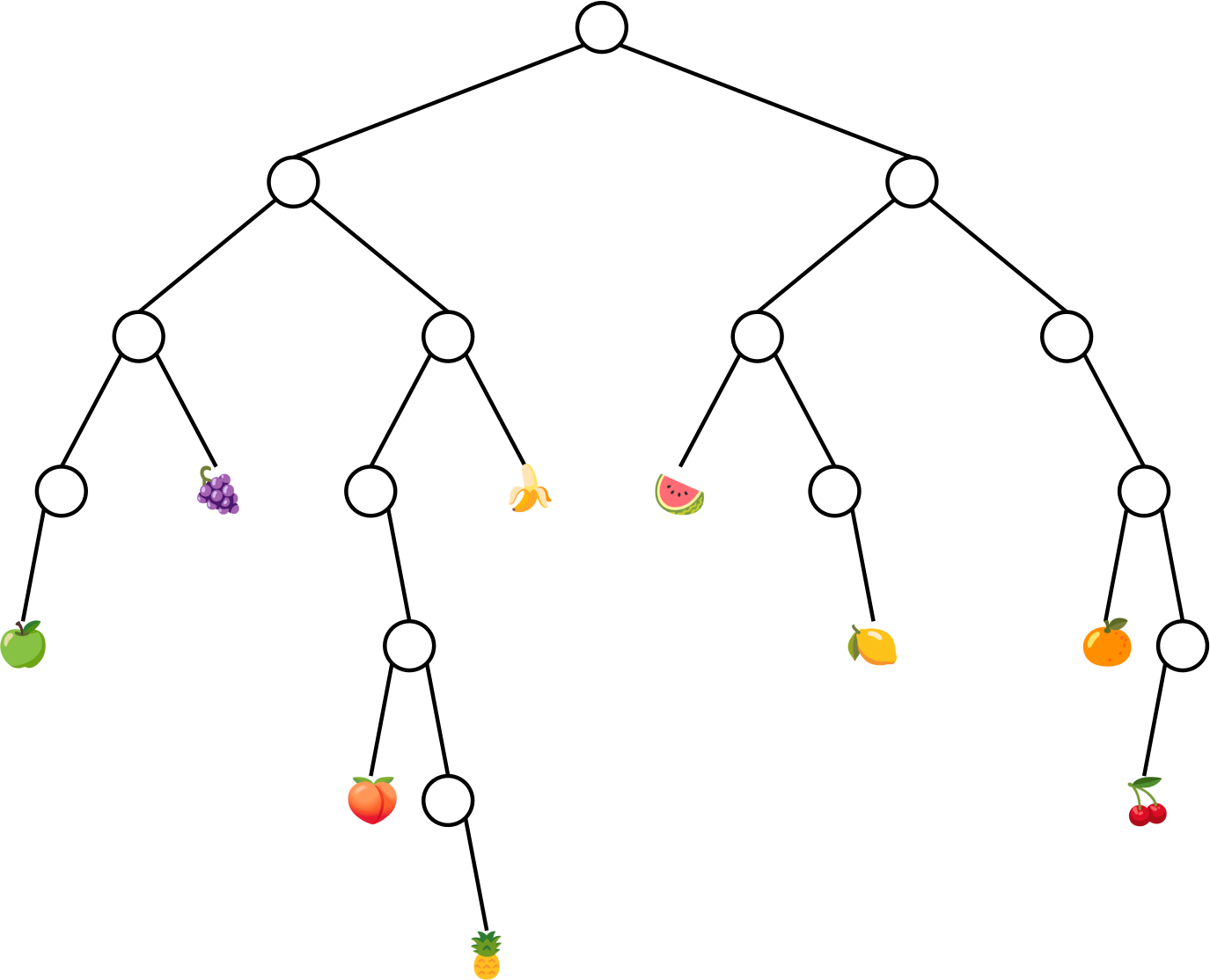
### Exercise: Address the Fruit Tree
Produce the numeric and lark-notated equivalent addresses for each of the following nodes in the binary fruit tree:
* 🍇
* 🍌
* 🍉
* 🍏
* 🍋
* 🍑
* 🍊
* 🍍
* 🍒
There is a solution at the bottom of the page.
### Exercise: Lark Notation
Use a lark expression to obtain the value 6 in the following noun represented by a binary tree:
```
.
/ \
/ \
/ \
. .
/ \ / \
/ . 10 .
/ / \ / \
. 8 9 11 .
/ \ / \
5 . 12 13
/ \
6 7
```
Use a lark expression to obtain the value `9` in the following noun: `[[[5 6 7] 8 9] 10 11 12 13]`.
Solutions to these exercises may be found at the bottom of this lesson.
## Wings
One can also identify a resource by a label, called a wing. A wing represents a depth-first search into the current subject (context). A wing is a limb resolution path into the subject. A wing expression indicates the path as a series of limb expressions separated by the `.` character. E.g.,
```hoon
inner-limb.outer-limb.limb
```
You can read this as `.inner-limb` in `.outer-limb` in `.limb`, etc. Notice that these read left-to-right!
A wing is a resolution path pointing to a limb. It's a search path, like an index to a particular labeled part of the subject.
Here are some examples:
```
> c.b:[[4 a=5] b=[c=14 15]]
14
> b.b:[b=[a=1 b=2 c=3] a=11]
2
> a.b:[b=[a=1 b=2 c=3] a=11]
1
> c.b:[b=[a=1 b=2 c=3] a=11]
3
> a:[b=[a=1 b=2 c=3] a=11]
11
> b.a:[b=[a=1 b=2 c=3] a=11]
-find.b.a
> g.s:[s=[c=[d=12 e='hello'] g=[h=0xff i=0b11]] r='howdy']
[h=0xff i=0b11]
> c.s:[s=[c=[d=12 e='hello'] g=[h=0xff i=0b11]] r='howdy']
[d=12 e='hello']
> e.c.s:[s=[c=[d=12 e='hello'] g=[h=0xff i=0b11]] r='howdy']
'hello'
> +3:[s=[c=[d=12 e='hello'] g=[h=0xff i=0b11]] r='howdy']
r='howdy'
> r.+3:[s=[c=[d=12 e='hello'] g=[h=0xff i=0b11]] r='howdy']
'howdy'
```
To locate a value in a named tuple data structure:
```
> =data [a=[aa=[aaa=[1 2] bbb=[3 4]] bb=[5 6]] b=[7 8]]
> -:aaa.aa.a.data
1
```
A wing is a limb resolution path into the subject. This definition includes as a trivial case a path of just one limb. Thus, all limbs are wings, and all limb expressions are wing expressions.
We mention this because it is convenient to refer to all limbs and non-trivial wings as simply “wings”.
### Names and Faces
A name can resolve either an arm or a leg of the subject. Recall that arms are for computations and legs are for data. When a name resolves to an arm, the relevant computation is run and the product of the computation is produced. When a limb name resolves to a leg, the value of that leg is produced.
Hoon doesn't have variables quite like other programming languages do. And instead of variable names, it has "faces". If you're coming in from antoher programming langauge, you can think of faces as variable names and faced values as named variables and you'll usually be okay. Faces play various roles in Hoon, but usually they're just labels for legs in the subject.
A face is a limb expression that consists of a series of alphanumeric characters. A face may contain a combination of lowercase letters, numbers, and `-`s. Faces must begin with a letter. Some example faces are `b`, `c3`, `var`, `this-is-kebab-case123`.
There are various ways to assign (or "pin") a face to a limb of the subject, but for now we'll just use the simplest method: `face=value`. Hereafter in the code, the expression `face` would be equivalent to the product of whatever code we gave as the `value`. This works because Hoon registers the given `face` as metadata about where the `value` is stored in the subject, so that when the `face` is invoked later, its data is produced through wing resolution. This means we can reference any computed result (be that code or data) in the subject by the `face` we assigned to it, which gives us some nice flexibility around code style.
Now we have several ways to access values:
```
> b=5
b=5
> [b=5 cat=6]
[b=5 cat=6]
> -:[b=5 cat=6]
b=5
> b:[b=5 cat=6]
5
> b2:[[4 b2=5] [cat=6 d=[14 15]]]
5
> d:[[4 b2=5] [cat=6 d=[14 15]]]
[14 15]
```
To be clear, `b=5` is equivalent in value to `5`, and `[[4 b2=5] [cat=6 d=[14 15]]]` is equivalent in value to `[[4 5] 6 14 15]`. The faces are not part of the underlying noun, they're stored as metadata about address values in the subject.
```
> (add b=5 1)
6
```
If you reference `face` and it isn't in the subject, you'll get a `-find.face` error:
```
> a:[b=12 c=14]
-find.a
[crash message]
```
You can even give faces to faces:
```
> b:[b=c=123 d=456]
c=123
```
### Duplicate Faces
There is no restriction against using the same face name for multiple limbs of the subject. This is one way in which faces aren't like ordinary variables:
```
> [[4 b=5] [b=6 b=[14 15]]]
[[4 b=5] b=6 b=[14 15]]
> b:[[4 b=5] [b=6 b=[14 15]]]
5
```
Why does this return `5` rather than `6` or `[14 15]`? When a face is evaluated on a subject, a head-first binary tree search occurs starting at address `1` of the subject. If there is no matching face for address *n* of the subject, first the head of *n* is searched and then *n*'s tail. The complete search path for `[[4 b=5] [b=6 b=[14 15]]]` is:
1. `[[4 b=5] [b=6 b=[14 15]]]`
2. `[4 b=5]`
3. `4`
4. `b=5`
5. `[b=6 b=[14 15]]`
6. `b=6`
7. `b=[14 15]`
There are matches at steps 4, 6, and 7 of the total search path, but the search ends when the first match is found at step 4.
The children of legs bearing names aren't included in the search path. For example, the search path of `[[4 a=5] b=[c=14 15]]` is:
1. `[[4 a=5] b=[c=14 15]]`
2. `[4 a=5]`
3. `4`
4. `a=5`
5. `b=[c=14 15]`
Neither of the legs `c=14` or `15` is checked. Accordingly, a search for `.c` of `[[4 a=5] b=[c=14 15]]` fails:
```
> c:[[4 b=5] [b=6 b=[c=14 15]]]
-find.c [crash message]
```
In any programming paradigm, good names are valuable and collisions (repetitions, e.g. a list named `+list`) are likely. There is no restriction against using the same face name for multiple limbs of the subject. This is one way in which faces aren't like ordinary variables. If multiple values match a particular face, we need a way to distinguish them. In other words, there are cases when you don't want the limb of the first matching face. You can ‘skip’ the first match by prepending `^` to the face. Upon discovery of the first match at address *n*, the search skips *n* (as well as its children) and continues the search elsewhere:
```
> ^b:[[4 b=5] [b=6 b=[14 15]]]
6
```
Recall that the search path for this noun is:
1. `[[4 b=5] [b=6 b=[14 15]]]`
2. `[4 b=5]`
3. `4`
4. `b=5`
5. `[b=6 b=[14 15]]`
6. `b=6`
7. `b=[14 15]`
The second match in the search path is step 6, `b=6`, so the value at that leg is produced. You can stack `^` characters to skip more than one matching face:
```
> a:[[[a=1 a=2] a=3] a=4]
1
> ^a:[[[a=1 a=2] a=3] a=4]
2
> ^^a:[[[a=1 a=2] a=3] a=4]
3
> ^^^a:[[[a=1 a=2] a=3] a=4]
4
```
When a face is skipped at some address *n*, neither the head nor the tail of *n* is searched:
```
> b:[b=[a=1 b=2 c=3] a=11]
[a=1 b=2 c=3]
> ^b:[b=[a=1 b=2 c=3] a=11]
-find.^b
```
The first `.b`, `b=[a=1 b=2 c=3]`, is skipped; so the entire head of the subject is skipped. The tail has no `.b`; so `^b` doesn't resolve to a limb when the subject is `[b=[a=1 b=2 c=3] a=11]`.
How do you get to that `b=2`? And how do you get to the `.c` in `[[4 a=5] b=[c=14 15]]`? In each case you should use a wing.
We say that the inner face has been "shadowed" when an outer face obscures it.
If you run into `^$`, don't go looking for a nonexistent `^$` ketbuc rune: it's referencing the outer `$` buc arm. `^$` is one way of setting up a `%=` [centis](/hoon/rune/cen.md#centis) loop/recursion of multiple cores with a `|-` [barhep](/hoon/rune/bar.md#barhep) trap nested inside of a `|=` [bartis](/hoon/rune/bar.md#bartis) gate, for instance.
Solution #1 in the [Rhonda Numbers](/hoon/examples/rhonda.md) tutorial in the Hoon Workbook illustrates using `^` ket to skip `$` buc matches.
### Limb Resolution Operators
There are two symbols we use to search for a face or limb:
* `.` dot resolves the wing path into the current subject.
* `:` col resolves the wing path with the right-hand-side as the subject.
Logically, `a:b` is two operations, while `a.b` is one operation. The compiler is smart about `:` col wing resolutions and reduces it to a regular lookup, though.
### What `%=` Does
Now we're equipped to go back and examine the syntax of the `%=` [centis](/hoon/rune/cen.md#centis) rune we have been using for recursion: it *resolves a wing with changes*, which in this particular case means that it takes the `$` (default) arm of the trap core, applies certain changes, and re-evaluates the expression.
```hoon
|= n=@ud
|-
~& n
?: =(n 1)
n
%+ mul
n
$(n (dec n))
```
The `$()` syntax is the commonly-used irregular form of the `%=` [centis](/hoon/rune/cen.md#centis) rune.
Now, we noted that `$` buc is the default arm for the trap. It turns out that `$` is also the default arm for some other structures, like the gate! That means we can cut out the trap, in the factorial example, and write something more compact like this:
```hoon
|= n=@ud
?: =(n 1)
1
(mul n $(n (dec n)))
```
It's far more common to just use a trap, but you will see `$` buc used to manipulate a core in many in-depth code instances.
### Expanding the Runes
`|=` [bartis](/hoon/rune/bar.md#bartis) produces a gate. It actually expands to
```hoon
=| a=spec
|% ++ $ b=hoon
--
```
where `=|` [tisbar](/hoon/rune/tis.md#tisbar) means to add its sample to the current subject with the given face.
Similarly, `|-` [barhep](/hoon/rune/bar.md#barhep) produces a core with one arm `$`. How could you write that in terms of `|%` and `++`?
### Example: Number to Digits
Compose a generator which accepts a number as `@ud` unsigned decimal and returns a list of its digits.
One verbose Hoon program
```hoon
!:
|= [n=@ud]
=/ values *(list @ud)
|- ^- (list @ud)
?: (lte n 0) values
%= $
n (div n 10)
values (weld ~[(mod n 10)] values)
==
```
Save this as a file `/gen/num2dig.hoon`, `|commit %base`, and run it:
```
> +num2dig 1.000
~[1 0 0 0]
> +num2dig 123.456.789
~[1 2 3 4 5 6 7 8 9]
```
A more idiomatic solution would use the `^` ket infix to compose a cell and build the list from the head first. (This saves a call to [`+weld`](/hoon/stdlib/2b.md#weld).)
```hoon
!:
|= [n=@ud]
=/ values *(list @ud)
|- ^- (list @ud)
?: (lte n 0) values
%= $
n (div n 10)
values (mod n 10)^values
==
```
A further tweak maps to `@t` ASCII characters instead of the digits.
```hoon
!:
|= [n=@ud]
=/ values *(list @t)
|- ^- (list @t)
?: (lte n 0) values
%= $
n (div n 10)
values (@t (add 48 (mod n 10)))^values
==
```
(Notice that we apply `@t` as a mold gate rather than using the tic notation. This is because `^` ket is a rare case where the order of evaluation of operators would cause the intuitive writing to fail.)
Extend the above generator so that it accepts a cell of type and value (a `$vase` as produced by the `!>` [zapgar](/hoon/rune/zap.md#zapgar) rune). Use the type to determine which number base the digit string should be constructed from; e.g. `+num2dig !>(0xdead.beef)` should yield `~['d' 'e' 'a' 'd' 'b' 'e' 'e' 'f']`.
### Exercise: Resolving Wings
Enter the following into dojo:
```hoon
=a [[[b=%bweh a=%.y c=8] b="no" c="false"] 9]
```
Test your knowledge from this lesson by evaluating the following expressions and then checking your answer in the Dojo or see the solutions below.
1. `b:a(a [b=%skrt a="four"])`
2. `^b:a(a [b=%skrt a="four"])`
3. `^^b:a(a [b=%skrt a="four"])`
4. `b.a:a(a [b=%skrt a="four"])`
5. `a.a:a(a [b=%skrt a="four"])`
6. `+.a:a(a [b=%skrt a="four"])`
7. `a:+.a:a(a [b=%skrt a="four"])`
8. `a(a a)`
9. `b:-<.a(a a)`
10. How many times does the atom `9` appear in `a(a a(a a))`?
The answers are at the bottom of the page.
## List operations
Once you have your data in the form of a `+list`, there are a lot of tools available to manipulate and analyze the data:
The [`+flop`](/hoon/stdlib/2b.md#flop) function reverses the order of the elements (exclusive of the `~`):
```
> (flop ~[1 2 3 4 5])
~[5 4 3 2 1]
```
### Exercise: `+flop` Yourself
Without using `+flop`, write a gate that takes a `(list @)` and returns it in reverse order. There is a solution at the bottom of the page.
The [`+sort`](/hoon/stdlib/2b.md#sort) function uses a `+list` and a comparison function (like [`+lth`](/hoon/stdlib/1a.md#lth)) to order things:
```
> (sort ~[1 3 5 2 4] lth)
~[1 2 3 4 5]
```
The [`+snag`](/hoon/stdlib/2b.md#snag) function takes an index and a `+list` to grab out a particular element (note that it starts counting at zero):
```
> (snag 0 `(list @)`~[11 22 33 44])
11
> (snag 1 `(list @)`~[11 22 33 44])
22
> (snag 3 `(list @)`~[11 22 33 44])
44
> (snag 3 "Hello!")
'l'
> (snag 1 "Hello!")
'e'
> (snag 5 "Hello!")
'!'
```
The [`+weld`](/hoon/stdlib/2b.md#weld) function takes two lists of the same type and concatenates them:
```
> (weld ~[1 2 3] ~[4 5 6])
~[1 2 3 4 5 6]
> (weld "Happy " "Birthday!")
"Happy Birthday!"
```
### Exercise: `+weld` Yourself
Without using weld, write a gate that takes a `[(list @) (list @)]` of which the product is the concatenation of these two lists. There is a solution at the bottom of the page.
There are a couple of sometimes-useful `+list` builders:
The [`+gulf`](/hoon/stdlib/2b.md#gulf) function spans between two numeric values (inclusive of both):
```
> (gulf 5 10)
~[5 6 7 8 9 10]
```
The [`+reap`](/hoon/stdlib/2b.md#reap) function repeats a value many times in a `+list`:
```
> (reap 5 0x0)
~[0x0 0x0 0x0 0x0 0x0]
> (reap 8 'a')
<|a a a a a a a a|>
> `tape`(reap 8 'a')
"aaaaaaaa"
> (reap 5 (gulf 5 10))
~[~[5 6 7 8 9 10] ~[5 6 7 8 9 10] ~[5 6 7 8 9 10] ~[5 6 7 8 9 10] ~[5 6 7 8 9 10]]
```
The [`+roll`](/hoon/stdlib/2b.md#roll) function takes a list and a gate, and accumulates a value of the list items using that gate. For example, if you want to add or multiply all the items in a list of atoms, you would use roll:
```
> (roll `(list @)`~[11 22 33 44 55] add)
165
> (roll `(list @)`~[11 22 33 44 55] mul)
19.326.120
```
Once you have a `+list` (including a tape), there are a lot of manipulation tools you can use to extract data from it or modify it:
* The [`+lent`](/hoon/stdlib/2b.md#lent) function takes `[a=(list)]` and gets the number of elements (length) of the list
* The [`+find`](/hoon/stdlib/2b.md#find) function takes `[nedl=(list) hstk=(list)]` and locates a sublist (`.nedl`, needle) in the list (`.hstk`, haystack)
* The [`+snap`](/hoon/stdlib/2b.md#snap) function takes `[a=(list) b=@ c=*]` and replaces the element at an index in the list (zero-indexed) with something else
* The [`+scag`](/hoon/stdlib/2b.md#scag) function takes `[a=@ b=(list)]` and produces the first *a* elements from the front of the list
* The [`+slag`](/hoon/stdlib/2b.md#slag) function takes `[a=@ b=(list)]` and produces all elements of the list including and after the element at index *a*
There are a few more that you should pick up eventually, but these are enough to get you started.
Using what we know to date, most operations that we would do on a collection of data require a trap.
### Exercise: Evaluating Expressions
Without entering these expressions into the Dojo, what are the products of the following expressions?
```hoon
(lent ~[1 2 3 4 5])
(lent ~[~[1 2] ~[1 2 3] ~[2 3 4]])
(lent ~[1 2 (weld ~[1 2 3] ~[4 5 6])])
```
### Exercise: Welding Nouns
First, bind these faces.
```
=b ~['moon' 'planet' 'star' 'galaxy']
=c ~[1 2 3]
```
Determine whether the following Dojo expressions are valid, and if so, what they evaluate to.
```
> (weld b b)
> (weld b c)
> (lent (weld b c))
> (add (lent b) (lent c))
```
### Exercise: Palindrome
Write a gate that takes in a list `.a` and returns `%.y` if `.a` is a palindrome and `%.n` otherwise. You may use the [`+flop`](/hoon/stdlib/2b.md#flop) function.
## Solutions to Exercises
### Fruit Tree
* 🍇 `9` or `-<+`
* 🍌 `11` or `->+`
* 🍉 `12` or `+<-`
* 🍏 `16` or `-<-<`
* 🍋 `27` or `+<+>`
* 🍊 `30` or `+>+<`
* 🍑 `42` or `->->-`
* 🍒 `62` or `+>+>-`
* 🍍 `87` or `->->+>`
### Resolving Lark Expressions
```
> =b [[[5 6 7] 8 9] 10 11 12 13]
> -<+<:b
6
```
### Resolving Wing Expressions
1. `%bweh`
2. `"no"`
3. Error: `ford: %slim failed:`
4. `%skrt`
5. `"four"`
6. `a="four"` - Note that this is different from the above!
7. `"four"`
8. `[[[b=%bweh a=[[[b=%bweh a=%.y c=8] b="no" c="false"] 9] c=8] b="no" c="false"] 9]`
9. `%bweh`
10. `9` appears 3 times:
```
> a(a a(a a))
[[[ b=%bweh a [[[b=%bweh a=[[[b=%bweh a=%.y c=8] b="no" c="false"] 9] c=8] b="no" c="false"] 9] c=8] b="no" c="false"] 9]
```
### Roll-Your-Own-`+flop`
```hoon
:: /gen/flop.hoon
::
|= a=(list @)
=| b=(list @)
|- ^- (list @)
?~ a b
$(b [i.a b], a t.a)
```
### Roll-Your-Own-`+weld`
```hoon
:: /gen/weld.hoon
::
|= [a=(list @) b=(list @)]
|- ^- (list @)
?~ a b
[i.a $(a t.a)]
```
### `+lent` expressions
Running each one in the Dojo:
```
> (lent ~[1 2 3 4 5])
5
> (lent ~[~[1 2] ~[1 2 3] ~[2 3 4]])
3
> (lent ~[1 2 (weld ~[1 2 3] ~[4 5 6])])
3
```
### `+weld` expressions
Running each one in the Dojo:
```
> (weld b b)
<|moon planet star galaxy moon planet star galaxy|>
```
The below will not run because `+weld` expects the elements of both lists to be of the same type, in this case a `(list @t)` or `(list @ud)`.
```
> (weld b c)
```
This also fails for the same reason, but it is important to note that in some languages that are more lazily evaluated, such an expression would still work since it would only look at the length of `.b` and `.c` and not worry about what the elements were. In that case, it would return `7`.
```
> (lent (weld b c))
```
We see here the correct way to find the sum of the length of two lists of unknown type.
```
> (add (lent b) (lent c))
7
```
### Palindrome
```hoon
:: palindrome.hoon
::
|= a=(list)
=(a (flop a))
```
---
# Agent Instructions
This documentation is published with GitBook. GitBook is the documentation platform designed so that both humans and AI agents can read, navigate, and reason over technical content effectively. Learn more at gitbook.com.
## Querying This Documentation
If you need additional information that is not directly available in this page, you can query the documentation by asking a question.
Perform an HTTP GET request on the following URL with the `ask` and `goal` query parameters:
```
GET https://docs.urbit.org/build-on-urbit/hoon-school/g-trees.md?ask=&goal=
```
`ask` is the immediate question: it should be specific, self-contained, and written in natural language.
`goal` is what the user is ultimately trying to achieve, the reason they need the answer. Sharing it helps GitBook give you a better, more relevant answer. A goal is most helpful when it describes the outcome the user wants rather than restating the question. For example, with `ask=how do I create an API token`, a goal like `automate deployments from our CI pipeline` lets GitBook tailor the answer to that use case.
The response will contain a direct answer to the question and relevant excerpts and sources from the documentation.
Use this mechanism when the answer is not explicitly present in the current page, you need clarification or additional context, or you want to retrieve related documentation sections.