> For the complete documentation index, see [llms.txt](https://docs.urbit.org/llms.txt). Markdown versions of documentation pages are available by appending `.md` to page URLs; this page is available as [Markdown](https://docs.urbit.org/build-on-urbit/userspace/dist/glob.md).
# Glob
Globs contain client-side resources (HTML, JS, CSS) for Landscape apps. Distribution over Ames or HTTP, Globulator tool, make-glob thread.
A `glob` contains the client bundle—client-side resources like HTML, JS, and CSS files—for a Landscape app distributed in a desk. Globs are managed separately from other files in desks because they often contain large files that frequently change, and would therefore bloat a ship's state if they were subject to Clay's revision control mechanisms.
The hash and source of an app's glob is defined in a desk's [docket file](/build-on-urbit/userspace/dist/docket.md). The `%docket` agent reads the docket file, obtains the glob from the specified source, and makes its contents available to the browser client. On a desk publisher's ship, if the glob is to be distributed over Ames, the glob is also made available to desk subscribers.
## The `glob` type
The `%docket`agent defines the type of a `glob` as:
```hoon
+$ glob (map path mime)
```
Given the following file heirarchy:
```
foo
├── css
│ └── style.css
├── img
│ ├── favicon.png
│ ├── foo.svg
│ └── bar.svg
├── index.html
└── js
└── baz.js
```
...its `$glob` form would look like:
```hoon
{ [p=/img/foo/svg q=[p=/image/svg+xml q=[p=0 q=0]]]
[p=/css/style/css q=[p=/text/css q=[p=0 q=0]]]
[p=/img/favicon/png q=[p=/image/png q=[p=0 q=0]]]
[p=/js/baz/js q=[p=/application/javascript q=[p=0 q=0]]]
[p=/img/bar/svg q=[p=/image/svg+xml q=[p=0 q=0]]]
[p=/index/html q=[p=/text/html q=[p=0 q=0]]]
}
```
Note: The mime byte-length and data are 0 in this example because it was made with empty dummy files.
A glob may contain any number of files and folders in any kind of heirarchy. The one important thing is that an `index.html` file is present in its root. The `index.html` file is automatically served when the app is opened in the browser and will fail if it is missing.
In addition to the `$glob` type, a glob can also be output to Unix with a `.glob` file extension for distribution over HTTP. This file simply contains a [`+jam`](/hoon/stdlib/2p.md#jam)med `$glob` structure.
## Docket file clause
The `desk.docket-0` file must include exactly one of the following clauses:
#### `site+/some/path`
If an app binds an Eyre endpoint and handles HTTP directly, for example with a [`%connect` task:eyre](/urbit-os/kernel/eyre/tasks.md#connect), the `%site` clause is used, specifying the Eyre binding. In this case a glob is omitted entirely.
#### `glob-ames+[~zod 0vs0me.h4sh]`
If the glob is to be distributed over Ames, the `%glob-ames` clause is used, with a cell of the `$ship` which has the glob and the `@uv` hash of the glob. If it's our ship, the hash can just be `0v0` and the glob can instead be created with the [Globulator](#globulator).
#### `glob-http+['https://example.com/some.glob' 0vs0me.h4sh]`
If the glob is to be distributed over HTTP, for example from an s3 instance, the `%glob-http` clause is used. It takes a cell of a `$cord` with the URL serving the glob and the `@uv` hash of the glob.
## Making a glob
There are a couple of different methods depending on whether the glob will be distributed over HTTP or Ames.
### Globulator
For globs distributed over Ames from our ship, the client bundle can be uploaded directly with `%docket`'s Globulator tool, which is available in the browser at `http[s]://[host]/docket/upload`. It looks like this:
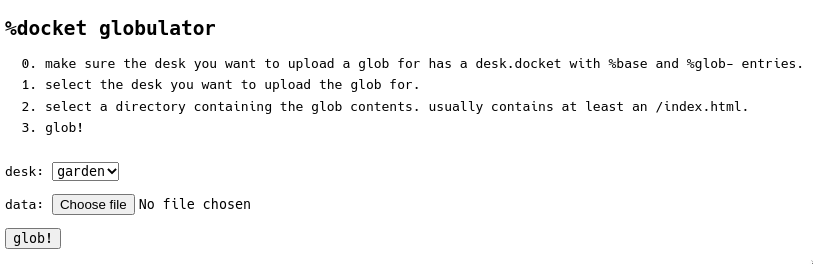
Simply select the target desk, select the folder to be globulated, and hit `glob!`.
Note the target desk must have been `|install`ed before uploading its glob. When installed, `%docket` will print `docket: awaiting manual glob for %desk-name desk` in the terminal and wait for the upload. The hash in the `%ames-glob` clause of the docket file will be overwritten by the hash of the new glob. As a result, there's no need to specify the actual glob hash in `desk.docket` - you can just use any `@uv` like `0v0`. Once uploaded, the desk can then be published with `:treaty|publish %desk-name` and the glob will become available for download by subscribers.
### `-make-glob`
There's a different process for globs to be distributed over HTTP from a webserver rather than over Ames from a ship. For this purpose, the `%landscape` desk includes a `%make-glob` thread. The thread takes a folder in a desk and produces a glob of the files it contains, which it then saves to Unix in a [`+jam`](/hoon/stdlib/2p.md#jam)file with a `.glob` extension.
To begin, you'll need to spin up a ship (typically a fake ship) and `|mount` a desk for which to add the files. In order for Clay to add the files, the desk must contain mark files in its `/mar` directory for all file extensions your folder contains. The `%landscape` desk is a good bet because it includes mark files for `.js`, `.html`, `.png`, `.svg`, `.woff2` and a couple of others. If there's no desk with a mark for a particular file type you want included in your glob, you may need to add a new mark file. A very rudimentary mark file like the `png.hoon` mark will suffice.
With the desk mounted, add the folder to be globbed to the root of the desk in Unix. It's imporant it's in the root because the `%make-glob` thread will only strip the first level of the folder heirarchy. Additionally ensure that all file names in the folder you're globbing are lowercase, otherwise this next step will not work correctly.
Next, `|commit` the files to the desk, then run `-landscape!make-glob %the-desk /folder-name`, where `%the-desk` is the desk containing the folder to be globbed and `/folder-name` is its name.
On Unix, if you look in `/path/to/pier/.urb/put`, you'll now see a file which looks like:
```
glob-0v1.7vpqa.r8pn5.6t0s1.rhc7r.5e9vo.glob
```
This file can be uploaded to your webserver and the `desk.docket-0` file of the desk you're publishing can be updated with:
```hoon
glob-http+['https://s3.example.com/glob-0v1.7vpqa.r8pn5.6t0s1.rhc7r.5e9vo.glob' 0v1.7vpqa.r8pn5.6t0s1.rhc7r.5e9vo]
```
---
# Agent Instructions
This documentation is published with GitBook. GitBook is the documentation platform designed so that both humans and AI agents can read, navigate, and reason over technical content effectively. Learn more at gitbook.com.
## Querying This Documentation
If you need additional information that is not directly available in this page, you can query the documentation by asking a question.
Perform an HTTP GET request on the following URL with the `ask` and `goal` query parameters:
```
GET https://docs.urbit.org/build-on-urbit/userspace/dist/glob.md?ask=&goal=
```
`ask` is the immediate question: it should be specific, self-contained, and written in natural language.
`goal` is what the user is ultimately trying to achieve, the reason they need the answer. Sharing it helps GitBook give you a better, more relevant answer. A goal is most helpful when it describes the outcome the user wants rather than restating the question. For example, with `ask=how do I create an API token`, a goal like `automate deployments from our CI pipeline` lets GitBook tailor the answer to that use case.
The response will contain a direct answer to the question and relevant excerpts and sources from the documentation.
Use this mechanism when the answer is not explicitly present in the current page, you need clarification or additional context, or you want to retrieve related documentation sections.